Block spyware from reaching your computer

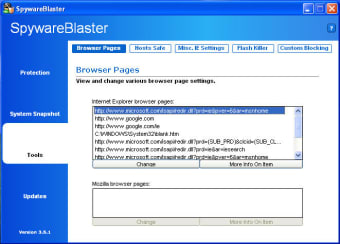
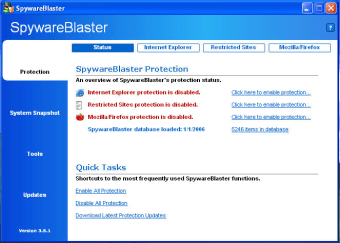
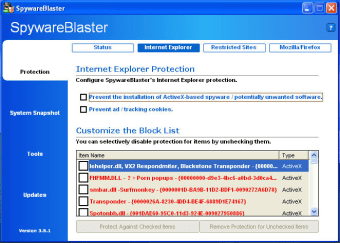
SpywareBlaster takes the approach that prevention is the best way to deal with Spyware attacks and in the main, it accomplishes this aim.

Most importantly, this program is completely free, simple to setup and and very straight-forward to use. It works by preventing the installation of adware and spyware by blocking them at source. In this way, you prevent attacks rather than having to scan for installed diallers, trojans and bots later with something like Ad-Aware. Of course, this is no easy task. One annoying aspect used to be that there was no auto update function but this has thankfully been solved in this latest version. Via these updates, the program is constantly updated with a blacklist of potential threats that the program monitors for. However, you do get the slight impression that nothing much is going on when it's installed. It doesn't seem to issue any update messages or warnings although it seems to be doing it's job properly. As a result, for many people, this program may seem a bit too flimsy to trust 100% but if run alongside something like Ad-Aware as a backup tool, you don't have much to lose by trying it.

A valient effort although I still wouldn't change it for the trio of Ad-Aware, SpyBot, and Spyware Terminator.

Changes

New Turbo-Update technology Adds various feature and protection enhancements, tweaks, and optimizations


  • Pros

    • Prevents Spyware attacks rather than scans for problems
    • Very light on RAM and CPU
  • Cons

    • Feels a bit too
    • Probably requires an Adware scanner to be safe
 0/3

App specs

  • License

    Free

  • Version

    6.0
  • Latest update

  • Platform

    Windows

  • OS

    Windows 2000

  • Language

    English

  • Downloads

    26.5K

    Last month's downloads

    • 26
  • Size

    4.43 MB

  • Developer

Program available in other languages


User reviews about SpywareBlaster

Have you tried SpywareBlaster? Be the first to leave your opinion!

Add review

You may also like

Alternatives to SpywareBlaster

Explore Apps

Latest articles

Laws concerning the use of this software vary from country to country. We do not encourage or condone the use of this program if it is in violation of these laws.
Softonic

Is SpywareBlaster safe?

100/100

Score result: Clean

This file passed a comprehensive security scan using VirusTotal technology. It is safe to download.

  • Virus free
  • Spyware free
  • Malware free
  • Verified by Security Partners

    VirusTotal logo

Scan Info

Last scan
Saturday, December 30, 2023
Scan provider
VirusTotal · Full report

File Integrity

File
spywareblastersetup60.exe
SHA256
961cadf53575d18d825340301e66103c55f24b34379de6523e2d936f005820e9
SHA1
915b4422ab9470816a9255674c46bc5bb49e733a

Softonic security commitment

SpywareBlaster has been thoroughly scanned by our advanced security systems and verified by industry-leading partners. This file comes from the official developer and has passed all our security checks, showing no signs of viruses, malware, or spyware. For more information, visit our Security and Trust Center